Subscriptions
Subscriptions in Paypercut allow merchants to automatically charge customers at predefined billing intervals after the first successful payment. They enable recurring business models such as SaaS plans, memberships, recurring services, and subscription deliveries.
Subscriptions are created and managed via API, allowing merchants to integrate recurring billing directly into their backend systems while Paypercut handles secure payment processing, automatic retries, and complex billing lifecycle management.
The Merchant Dashboard provides visibility into created resources such as customers, products, prices, and subscriptions.
What subscriptions give merchants
- Automated recurring payments – Customers are charged automatically according to the configured billing schedule.
- Reduced payment friction – Customers complete checkout once and continue using the service without repeating the payment process.
- Flexible subscription offerings – Merchants can define multiple subscription plans using combinations of products, prices, or fully inline price definitions.
- Multi-item billing – Multiple products or add-ons can be combined into a single subscription, billed as one charge per cycle.
- One-time charges alongside recurring – Setup fees or activation charges can be collected at creation without ever repeating on renewal cycles.
- Scheduled phase transitions – Subscription schedules allow automatic pricing changes, plan upgrades, and fixed-duration contracts — all configured upfront with no manual intervention.
- Operational visibility – The Merchant Dashboard allows merchants to review and manage customers, products, prices, and subscriptions.
Merchant Dashboard: https://dashboard.paypercut.io
Before you start
API credentials All API requests require authentication using your Paypercut API keys. You can obtain your credentials from the Merchant Dashboard.
Merchant dashboard: https://dashboard.paypercut.io
API reference: https://docs.paypercut.io/api-reference
Testing Developers should first test the subscription workflow using test credentials before switching to production credentials.
Idempotent requests When creating resources such as customers, products, prices, subscriptions, or checkout sessions, it is recommended to use idempotency keys to prevent duplicate resource creation when retrying requests.
How subscriptions work
Subscriptions in Paypercut are composed of several connected resources.
-
Customer – The end user who owns the subscription
-
Product – The offering being sold (optional when using inline price_data)
-
Price – Defines billing configuration such as amount and billing interval (optional when using inline price_data)
-
Payment Method – The reusable payment method stored for future subscription charges
-
Subscription – Links a customer to one or more priced items with a billing schedule — the first charge fires immediately when the subscription is created
-
Subscription Schedule – An optional timeline of phases that controls how the subscription evolves over time (pricing changes, setup fees, fixed-duration contracts)
-
Checkout Session – Used to create the subscription, collect the first payment, and save a reusable payment method ( COMING SOON )
The one rule that drives billing
Every subscription item is either recurring or one-time. This determines when it is charged:
| Item type | Charged at creation | Charged on renewal cycles |
|---|---|---|
Item with recurring config |
✅ Yes | ✅ Yes — every cycle |
Item without recurring (setup fee) |
✅ Yes | ❌ Never |
This rule is enforced in the billing engine. Even if a one-time item is still present on the subscription when the next dunning cycle fires, it will never be charged again.
Subscription setup flow
Step 1 — Create or retrieve the customer
The customer object represents the end user who will own the subscription.
API reference: https://docs.paypercut.io/api-reference/tag/customers/post/v1/customers
Step 2 — Save and attach a reusable payment method
Before creating a subscription, save a reusable payment method for the customer. This token is used for the initial charge and for all future recurring charges. If default_payment_method is not set on the subscription, renewal billing will fall back to the customer's default payment method. If neither is set, future billing cycles will fail.
Common ways to save a payment method:
- Checkout sessions — a client-driven flow that collects payment details and saves a reusable payment method. See: POST /v1/checkouts — https://docs.paypercut.io/api-reference/tag/checkout-sessions/post/v1/checkouts
- Setup Intents — server-driven tokenization flow that tokenizes and attaches a payment method to a customer without charging immediately. See: POST /v1/setup_intents — https://docs.paypercut.io/api-reference/tag/setup-intents/post/v1/setup_intents
- Payment Method Configurations — configure tokenization or saved-payment behavior: POST /v1/payment-configs — https://docs.paypercut.io/api-reference/tag/payment-method-configurations/post/v1/payment-configs
payment_methodvsdefault_payment_methodWhen creating a subscription,payment_methodis the token used for the first charge.default_payment_methodis the token stored for all later renewals and dunning retries. You should set both. Ifdefault_payment_methodis omitted, future billing cycles will have no stored payment method and will fail.
If you use the hosted checkout, you can collect and save the payment method there; otherwise use Setup Intents to tokenize and attach server-side. Webhook events (e.g., setup_intent.succeeded) are the source of truth for successful tokenization.
Step 3 — Create the product (optional)
The product represents the service or offering being subscribed to. This step is only required if you are using catalog-managed pricing (price references). If you are using inline price_data on subscription items, you can skip steps 3 and 4.
API reference: POST /v1/products https://docs.paypercut.io/api-reference/tag/products/post/v1/products
Step 4 — Create the price (optional)
A price defines the billing configuration for the product, including the amount and billing interval. Only required when using catalog-managed pricing.
API reference: POST /v1/prices https://docs.paypercut.io/api-reference/tag/prices/post/v1/prices
Step 5 — Create the subscription via the API
Create the subscription with minimal required data by linking a customer, one or more items, and a payment method. If no billing_cycle_anchor is provided, it defaults to the current time.
Required fields:
customer— customer ID (26-character ULID)items— array of 1–20 items (using eitherpricereference or inlineprice_data)default_payment_method— token stored for all future renewals (optional — falls back to customer default payment method)
Optional fields:
billing_cycle_anchor— ISO 8601 datetime setting the billing anchor; defaults to now if omittedbilling_cycle_anchor_config— structured config for anchor calculation (mutually exclusive withbilling_cycle_anchor)trial_period_daysortrial_end— start the subscription in a trial period (mutually exclusive)currency— subscription-level currency fallback when not specified per itempayment_behavior— controls how payment is collected at creation (see Payment behavior section below)
Currency must be provided either at the subscription level (currency) or on each item (currency field or price_data.currency). All items must share the same currency. If no currency can be resolved for an item, the request is rejected.
Subscription patterns
Pattern 1 — Simple recurring subscription
The most common case. A single item billed at a fixed interval, indefinitely.
POST /api/v1/subscriptions
{
  "customer": "01KJQ34MWYH0TES77RDXA8T8CY",
  "default_payment_method": "01HV7Z8K8M6X9W3YQ4T2P1ABCD",
  "items": [
    {
      "price": "01HV7Z8K8M6X9W3YQ4T2P1ABCE",
      "unit_amount": 1000,
      "currency": "usd",
      "recurring": { "interval": "monthly", "interval_count": 1 }
    }
  ]
}
- Creation → $10 charged immediately
- Every month → $10 charged automatically
- Continues indefinitely until cancelled
Pattern 2 — Multiple items, one charge per cycle
Multiple products or add-ons on a single subscription. All recurring items are summed into one payment per billing cycle. All items must share the same billing interval and currency.
POST /api/v1/subscriptions
{
  "customer": "01KJQ34MWYH0TES77RDXA8T8CY",
  "default_payment_method": "01HV7Z8K8M6X9W3YQ4T2P1ABCD",
  "items": [
    {
      "price": "01HV7Z8K8M6X9W3YQ4T2P1ABCF",
      "unit_amount": 1000,
      "currency": "usd",
      "recurring": { "interval": "monthly", "interval_count": 1 }
    },
    {
      "price": "01HV7Z8K8M6X9W3YQ4T2P1ABCE",
      "unit_amount": 500,
      "currency": "usd",
      "recurring": { "interval": "monthly", "interval_count": 1 }
    }
  ]
}
- Creation → $15 charged (base $10 + add-on $5, combined into one payment)
- Every month → $15 charged
- Line items are tracked separately — each item is visible in the subscription record
Pattern 3 — Trial then billing
Start a subscription in a free trial period. No charge is collected until the trial ends. Provide either trial_period_days (convenience) or trial_end (exact datetime).
POST /api/v1/subscriptions
Option A — using trial_period_days (convenience):
{
  "customer": "01KJQ34MWYH0TES77RDXA8T8CY",
  "default_payment_method": "01HV7Z8K8M6X9W3YQ4T2P1ABCD",
  "trial_period_days": 14,
  "items": [
    {
      "price": "01HV7Z8K8M6X9W3YQ4T2P1ABCE",
      "unit_amount": 1000,
      "currency": "usd",
      "recurring": { "interval": "monthly", "interval_count": 1 }
    }
  ]
}
Option B — using trial_end (exact datetime):
{
  "customer": "01KJQ34MWYH0TES77RDXA8T8CY",
  "default_payment_method": "01HV7Z8K8M6X9W3YQ4T2P1ABCD",
  "trial_end": "2026-04-02T00:00:00Z",
  "items": [
    {
      "price": "01HV7Z8K8M6X9W3YQ4T2P1ABCE",
      "unit_amount": 1000,
      "currency": "usd",
      "recurring": { "interval": "monthly", "interval_count": 1 }
    }
  ]
}
Both produce the same result — use trial_period_days when you want a relative duration, trial_end when you need to pin an exact date.
- Creation → Status:
trialing, no charge - At
trial_end→ First charge fires: $10 - Every month → $10 charged
To end a trial immediately, update the subscription with trial_end: "now".
If the customer has no payment method when the trial ends, the subscription is automatically cancelled (configurable via trial_settings.end_behavior.missing_payment_method).
Pattern 4 — Setup fee + recurring
A one-time onboarding or activation fee charged at creation, followed by a recurring plan. The fee never repeats. This pattern can be achieved two ways.
Option A — Direct subscription (simpler)
The setup fee item has no recurring field. The billing engine charges all items at creation, then filters the setup fee out on every subsequent cycle automatically. The fee remains visible on the subscription record but is never charged again.
POST /api/v1/subscriptions
{
  "customer": "01KJQ34MWYH0TES77RDXA8T8CY",
  "default_payment_method": "01HV7Z8K8M6X9W3YQ4T2P1ABCQ",
  "items": [
    {
      "price": "01HV7Z8K8M6X9W3YQ4T2P1ABCE",
      "unit_amount": 5000,
      "currency": "usd"
    },
    {
      "price": "01HV7Z8K8M6X9W3YQ4T2P1ABCF",
      "unit_amount": 1000,
      "currency": "usd",
      "recurring": { "interval": "monthly", "interval_count": 1 }
    }
  ]
}
- Creation → $60 charged ($50 setup fee + $10 first month)
- Every month after → $10 only — setup fee is permanently filtered by the billing engine
- Setup fee remains visible in the subscription items record
Option B — Subscription schedule (cleaner record)
Use this when you want the setup fee to be physically removed from the subscription after the first cycle — for example for reporting or dashboard cleanliness. Phase 0 includes the fee, Phase 1 drops it.
POST /api/v1/subscription-schedules
{
  "customer": "01KJQ34MWYH0TES77RDXA8T8CY",
  "default_settings": { "default_payment_method": "01HV7Z8K8M6X9W3YQ4T2P1ABCD" },
  "end_behavior": "RELEASE",
  "phases": [
    {
      "start_date": "2026-03-19T00:00:00Z",
      "items": [
        {
          "price": "01HV7Z8K8M6X9W3YQ4T2P1ABCF",
          "unit_amount": 5000,
          "currency": "usd"
        },
        {
          "price": "01HV7Z8K8M6X9W3YQ4T2P1ABCE",
          "unit_amount": 1000,
          "currency": "usd",
          "recurring": { "interval": "monthly", "interval_count": 1 }
        }
      ]
    },
    {
      "start_date": "2026-04-19T00:00:00Z",
      "items": [
        {
          "price": "01HV7Z8K8M6X9W3YQ4T2P1ABCD",
          "unit_amount": 1000,
          "currency": "usd",
          "recurring": { "interval": "monthly", "interval_count": 1 }
        }
      ]
    }
  ]
}
- Creation → $60 charged ($50 setup fee + $10 first month)
- Month 2 onward → $10 only — setup fee is removed from the subscription record when Phase 1 activates
Which option to use: If you only need the fee charged once, Option A is simpler. Use Option B if you need the fee removed from the subscription record after the first cycle.
Pattern 5 — Fixed-duration contract
A subscription that bills for a fixed period and then automatically cancels. No manual intervention required. This pattern requires a subscription schedule — there is no way to express automatic cancellation at a future date on a direct subscription.
POST /api/v1/subscription-schedules
{
  "customer": "01KJQ34MWYH0TES77RDXA8T8CY",
  "default_settings": { "default_payment_method": "01HV7Z8K8M6X9W3YQ4T2P1ABCD" },
  "end_behavior": "CANCEL",
  "phases": [
    {
      "start_date": "2026-03-19T00:00:00Z",
      "end_date":   "2027-03-19T00:00:00Z",
      "items": [
        {
          "price": "01HV7Z8K8M6X9W3YQ4T2P1ABCE",
          "unit_amount": 1000,
          "currency": "usd",
          "recurring": { "interval": "monthly", "interval_count": 1 }
        }
      ]
    }
  ]
}
- Months 1–12 → $10 charged each month
- Month 13 (2027-03-19) → Schedule completes, subscription is automatically cancelled
end_behavior: "CANCEL"drives the automatic cancellation — no webhook or manual action needed
Use end_behavior: "RELEASE" if the subscription should continue indefinitely after the schedule completes.
Pattern 6 — Intro pricing transitioning to full price
Charge a discounted rate for an initial period, then automatically switch to the full price. The transition is scheduled upfront and happens automatically. This pattern requires a subscription schedule — a direct subscription has a fixed set of items and cannot automatically change price mid-lifecycle.
POST /api/v1/subscription-schedules
{
  "customer": "01KJQ34MWYH0TES77RDXA8T8CY",
  "default_settings": { "default_payment_method": "01HV7Z8K8M6X9W3YQ4T2P1ABCD" },
  "end_behavior": "RELEASE",
  "phases": [
    {
      "start_date": "2026-03-19T00:00:00Z",
      "end_date":   "2026-06-19T00:00:00Z",
      "items": [
        {
          "price": "01HV7Z8K8M6X9W3YQ4T2P1ABCF",
          "unit_amount": 500,
          "currency": "usd",
          "recurring": { "interval": "monthly", "interval_count": 1 }
        }
      ]
    },
    {
      "start_date": "2026-06-19T00:00:00Z",
      "items": [
        {
          "price": "01HV7Z8K8M6X9W3YQ4T2P1ABCE",
          "unit_amount": 1000,
          "currency": "usd",
          "recurring": { "interval": "monthly", "interval_count": 1 }
        }
      ]
    }
  ]
}
- Months 1–3 → $5/month (intro rate)
- Month 4 onward → $10/month (full rate, automatic transition)
Pattern 7 — Setup fee + intro pricing + full price
The most complete real-world pattern. An onboarding fee charged once at creation, a discounted intro period, then full ongoing pricing — all in a single API call. This pattern requires a subscription schedule — it combines a price transition (requires phases) with a setup fee.
POST /api/v1/subscription-schedules
{
  "customer": "01KJQ34MWYH0TES77RDXA8T8CY",
  "default_settings": { "default_payment_method": "01HV7Z8K8M6X9W3YQ4T2P1ABCD" },
  "end_behavior": "RELEASE",
  "phases": [
    {
      "start_date": "2026-03-19T00:00:00Z",
      "end_date":   "2026-06-19T00:00:00Z",
      "items": [
        { "price": "01HV7Z8K8M6X9W3YQ4T2P1ABCE", "unit_amount": 5000, "currency": "usd" },
        { "price": "01HV7Z8K8M6X9W3YQ4T2P1ABCF", "unit_amount":  500, "currency": "usd",
          "recurring": { "interval": "monthly", "interval_count": 1 } }
      ]
    },
    {
      "start_date": "2026-06-19T00:00:00Z",
      "items": [
        { "price": "01HV7Z8K8M6X9W3YQ4T2P1ABCG", "unit_amount": 1000, "currency": "usd",
          "recurring": { "interval": "monthly", "interval_count": 1 } }
      ]
    }
  ]
}
- Creation → $55 charged ($50 setup fee + $5 intro month 1)
- Months 2–3 → $5/month (intro, setup fee never repeats)
- Month 4 onward → $10/month (full rate, automatic)
Pattern 8 — Payment behavior
payment_behavior controls how payment is collected when the subscription is created. This is a creation-time setting — it determines whether a charge fires immediately, is deferred to Temporal, or must succeed before the subscription exists.
default_incomplete (default)
Subscription is created immediately as incomplete. Temporal owns all charge attempts (0, 1, 2). If all three fail, status becomes incomplete_expired.
{
  "customer": "01KJQ34MWYH0TES77RDXA8T8CY",
  "default_payment_method": "01HV7Z8K8M6X9W3YQ4T2P1ABCD",
  "payment_behavior": "default_incomplete",
  "items": [
    {
      "price": "01HV7Z8K8M6X9W3YQ4T2P1ABCE",
      "unit_amount": 1000,
      "currency": "usd",
      "recurring": { "interval": "monthly", "interval_count": 1 }
    }
  ]
}
- Creation → Status:
incomplete - Temporal attempt 0 → success →
active - Temporal attempt 0 → fail → attempt 1 (24h) → attempt 2 (48h) → all fail →
incomplete_expired
allow_incomplete
A charge is attempted immediately after the subscription and Temporal schedule are created. If the charge succeeds, status is set to active. If it fails, status is set to past_due and Temporal takes over dunning. Dunning exhaustion → canceled.
{
  "customer": "01KJQ34MWYH0TES77RDXA8T8CY",
  "default_payment_method": "01HV7Z8K8M6X9W3YQ4T2P1ABCD",
  "payment_behavior": "allow_incomplete",
  "items": [
    {
      "price": "01HV7Z8K8M6X9W3YQ4T2P1ABCE",
      "unit_amount": 1000,
      "currency": "usd",
      "recurring": { "interval": "monthly", "interval_count": 1 }
    }
  ]
}
- Creation → charge attempted inline
- Charge succeeds → Status:
active - Charge fails → Status:
past_due→ dunning retries → all fail →canceled
error_if_incomplete
The charge is attempted before any subscription or schedule is created. If the charge fails, a 402 is returned and nothing is created. If it succeeds, the subscription is created directly as active.
Cannot be combined with trial_end, trial_period_days, billing_cycle_anchor, or collection_method=send_invoice.
{
  "customer": "01KJQ34MWYH0TES77RDXA8T8CY",
  "default_payment_method": "01HV7Z8K8M6X9W3YQ4T2P1ABCD",
  "payment_behavior": "error_if_incomplete",
  "items": [
    {
      "price": "01HV7Z8K8M6X9W3YQ4T2P1ABCE",
      "unit_amount": 1000,
      "currency": "usd",
      "recurring": { "interval": "monthly", "interval_count": 1 }
    }
  ]
}
- Charge succeeds → Status:
active(subscription created) - Charge fails →
402 card_declined— no subscription created, nothing to roll back
402 error response:
{
  "code": "card_declined",
  "message": "Your card has insufficient funds.",
  "statusCode": 402,
  "details": {
    "type": "card_error",
    "decline_code": "insufficient_funds"
  }
}
payment_behavior with trials
When a trial is set, no charge runs at creation regardless of payment_behavior — the subscription starts as trialing. error_if_incomplete cannot be used with a trial and is rejected at validation.
payment_behavior |
With trial | Without trial (charge succeeds) | Without trial (charge fails) |
|---|---|---|---|
default_incomplete |
trialing |
active (via Temporal attempt 0) |
incomplete_expired (after all retries) |
allow_incomplete |
trialing |
active |
past_due → canceled |
error_if_incomplete |
❌ 400 rejected | active |
402 — nothing created |
payment_behavior on update
When updating a subscription, only allow_incomplete and default_incomplete are accepted — error_if_incomplete is a creation-time guarantee that cannot be applied retroactively.
{
  "payment_behavior": "allow_incomplete"
}
When to use subscriptions vs subscription schedules
| Use case | Approach |
|---|---|
| Simple indefinite recurring billing | POST /subscriptions |
| Multiple products or add-ons, one monthly charge | POST /subscriptions with multiple items |
| Free trial before billing starts | POST /subscriptions with trial_period_days or trial_end |
| One-time setup fee + recurring (fee stays on record) | POST /subscriptions with a no-recurring item |
| One-time setup fee + recurring (fee removed after first cycle) | Subscription schedule — 2 phases |
| Fixed-duration contract (N months, then cancel) | Subscription schedule — end_date + end_behavior: CANCEL |
| Intro pricing transitioning to full price | Subscription schedule — 2 phases with different amounts |
| Setup fee + intro pricing + full price | Subscription schedule — 3 phases |
Subscription lifecycle
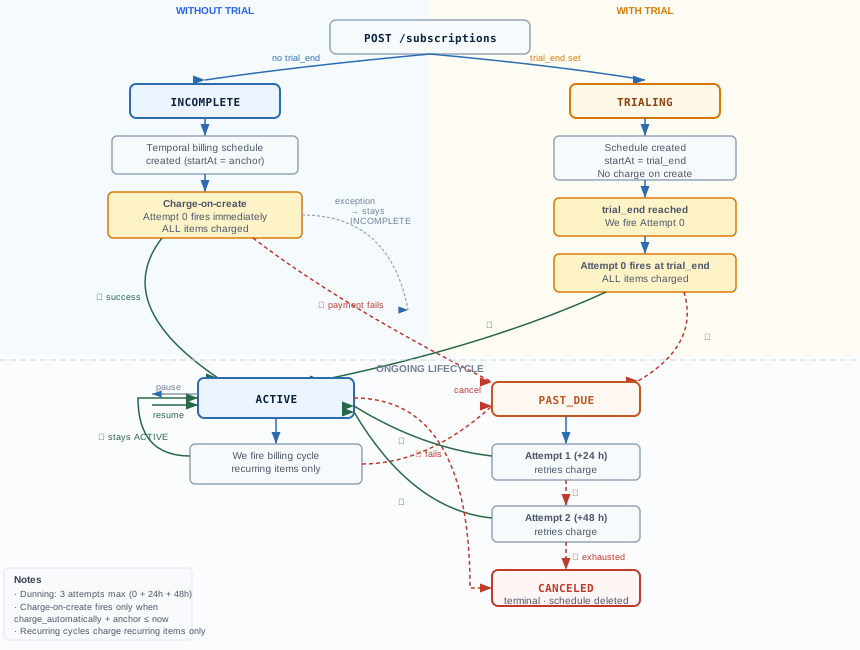
Subscriptions transition through the following states:
| Status | Description |
|---|---|
incomplete |
Subscription created but first payment not yet collected. For default_incomplete: Temporal owns all charge attempts. For allow_incomplete: first inline charge failed, dunning retries in progress |
trialing |
Subscription is within a free trial period; no charge until trial ends |
active |
Subscription is active and billing normally |
past_due |
The most recent renewal charge failed; dunning retries are in progress |
unpaid |
All dunning retries exhausted; subscription is unpaid and no further retries will occur |
paused |
Billing is temporarily paused |
canceled |
Subscription has been canceled (terminal) |
incomplete_expired |
All dunning attempts exhausted on a default_incomplete subscription; no further retries (terminal) |
Dunning (automatic payment retry)
When a renewal charge fails, the subscription moves to past_due and Paypercut automatically retries the charge according to the configured dunning schedule.
| Attempt | Timing |
|---|---|
| Attempt 1 (initial) | At renewal date |
| Attempt 2 | 24 hours after failure |
| Attempt 3 | 48 hours after failure |
After all retries are exhausted, the terminal status depends on payment_behavior:
payment_behavior |
Exhaustion status |
|---|---|
default_incomplete |
incomplete_expired |
allow_incomplete |
canceled |
Merchants can also cancel a past-due subscription at any time.
Dunning retries are durable — powered by Temporal, they survive service restarts and guarantee no billing attempt is silently lost.
Trial subscriptions
To start a subscription in a trial period, provide exactly one of:
trial_end— ISO 8601 datetime for when the trial ends (must be in the future)trial_period_days— integer (1–730); resolved totrial_end = now + N daysinternally; never stored or returned
When a trial is active:
- Subscription status is set to
trialing trial_startis automatically set to the current time- The initial charge is skipped; billing begins at
trial_end trial_settingsdefaults to{ end_behavior: { missing_payment_method: "cancel" } }
trial_period_days and trial_end are mutually exclusive — providing both returns a validation error.
Example — trial subscription:
{
  "customer": "01KJQ34MWYH0TES77RDXA8T8TT",
  "default_payment_method": "pm_xxxx",
  "trial_period_days": 14,
  "items": [
    {
      "price_data": {
        "currency": "usd",
        "product": "01KJXXXXXXXXXXXXXXXXXXXXXX",
        "unit_amount": 4999,
        "recurring": {
          "interval": "monthly",
          "interval_count": 1
        }
      },
      "quantity": 1
    }
  ]
}
To end a trial immediately, update the subscription with trial_end: "now".
Billing intervals
The recurring.interval field on a subscription item accepts both lowercase and uppercase values. The API normalizes them internally.
Accepted values: daily, weekly, monthly, quarterly, yearly (or uppercase equivalents).
interval_count sets the multiplier — for example, interval: "monthly" with interval_count: 3 bills every 3 months.
interval_total_cycles limits the number of billing cycles before the subscription ends automatically. Set to null (or omit) for indefinite billing. For example, interval: "monthly" with interval_total_cycles: 12 bills for exactly 12 months then stops.
All recurring items within a single subscription must share the same billing interval and interval_count. Mixed intervals (e.g. one monthly item and one yearly item) are not supported on a single subscription.
Full reference: https://docs.paypercut.io/api-reference/tag/subscriptions/get/v1/subscriptions/id
Related:

