WooCommerce
Installation & Setup Guide
This guide explains how to install and configure the Paypercut Payments Plugin for WooCommerce so you can start accepting online payments.
Before you start
You will need:
- A Paypercut merchant account — register at https://dashboard.paypercut.io/register
- Paypercut API keys (sandbox for testing, production for live)
- Admin access to your WooCommerce store
- Supported WooCommerce versions: 6.6 or higher
Step 1 — Install the Paypercut plugin
- Log in to your WooCommerce Admin panel.
- Download the plugin from this link: https://wordpress.org/plugins/paypercut-payments-for-woocommerce/. Alternatively, search for and add Paypercut Payments for WooCommerce in the plugins directory
Step 2 — Configure the Paypercut Plugin settings
-
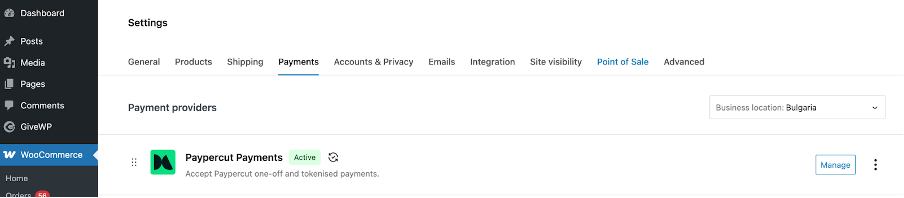
From your WooCommerce Admin panel go to Settings -> Payments and find the Paypercut plugin
-
Click "Manage"
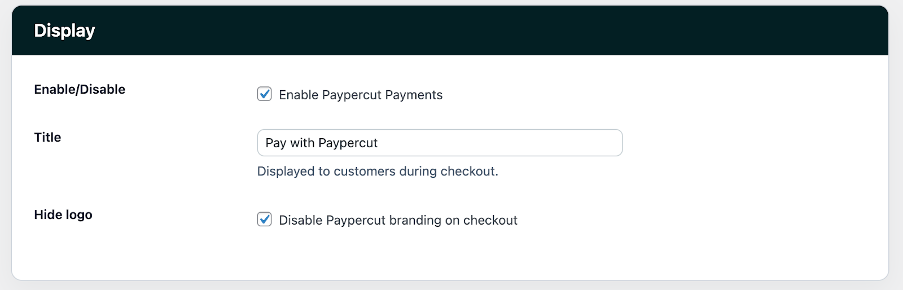
- Configure the following display settings:
- Enable Paypercut Payments
- Enter a title to be displayed to customers during checkout
- Choose whether to enable or disable Paypercut branding on checkout
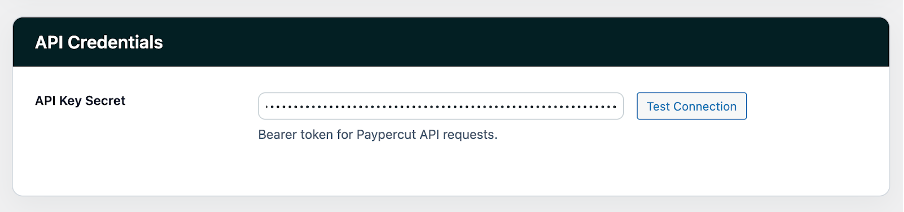
- Set the API configuration
- API Key: paste the Paypercut API key generated in the Paypercut Merchant Portal
- Click on the "Test Connection" button to verify connectivity
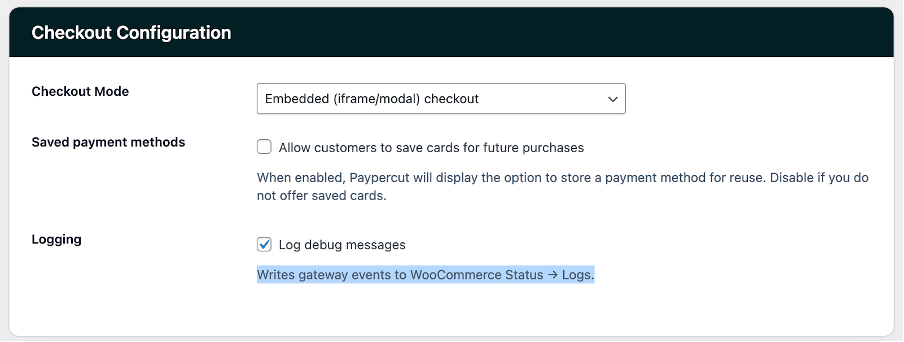
- Configure the Checkout settings
- Checkout Mode: Choose between Embeded or Hosted checkout mode
- Saved payment methods: Choose whether to allow customers to save their card for future payments
- Logging: Choose whether you want to log debug messages
- Click on "Save changes"
Now you should be able to accept payments with the Pypercut plugin
FAQ
Q: Do I need anything besides the API Key?
A: No — the API Key is the only credential required for the plugin.
Q: Is the API Key created in WooCommerce?
A: No — please create and copy the API key from your Paypercut Merchant Dashboard.
Q: Will installing Paypercut affect my existing checkout?
A: No — Paypercut is installed as an additional payment option.
For further help
- Merchant Dashboard: https://dashboard.paypercut.io
- Developer docs & API reference: https://docs.paypercut.io/api-reference
- Support: help@paypercut.co